✨ Self-hosted · One-time purchase · PHP + MariaDB

Sequences that start
the moment they confirm

The self-hosted automation engine for PHP — welcome series, onboarding drips and nurture flows, run by cron on your own server.

CloudWizard Flow Engine runs timed, multi-step email sequences on your own server — a subscriber who confirms onto a list is enrolled automatically and receives each step on schedule. Use it on its own, or as the automation layer of the complete CloudWizard Suite.

Get CloudWizard Flow Engine — €49 → 👀 See the demo
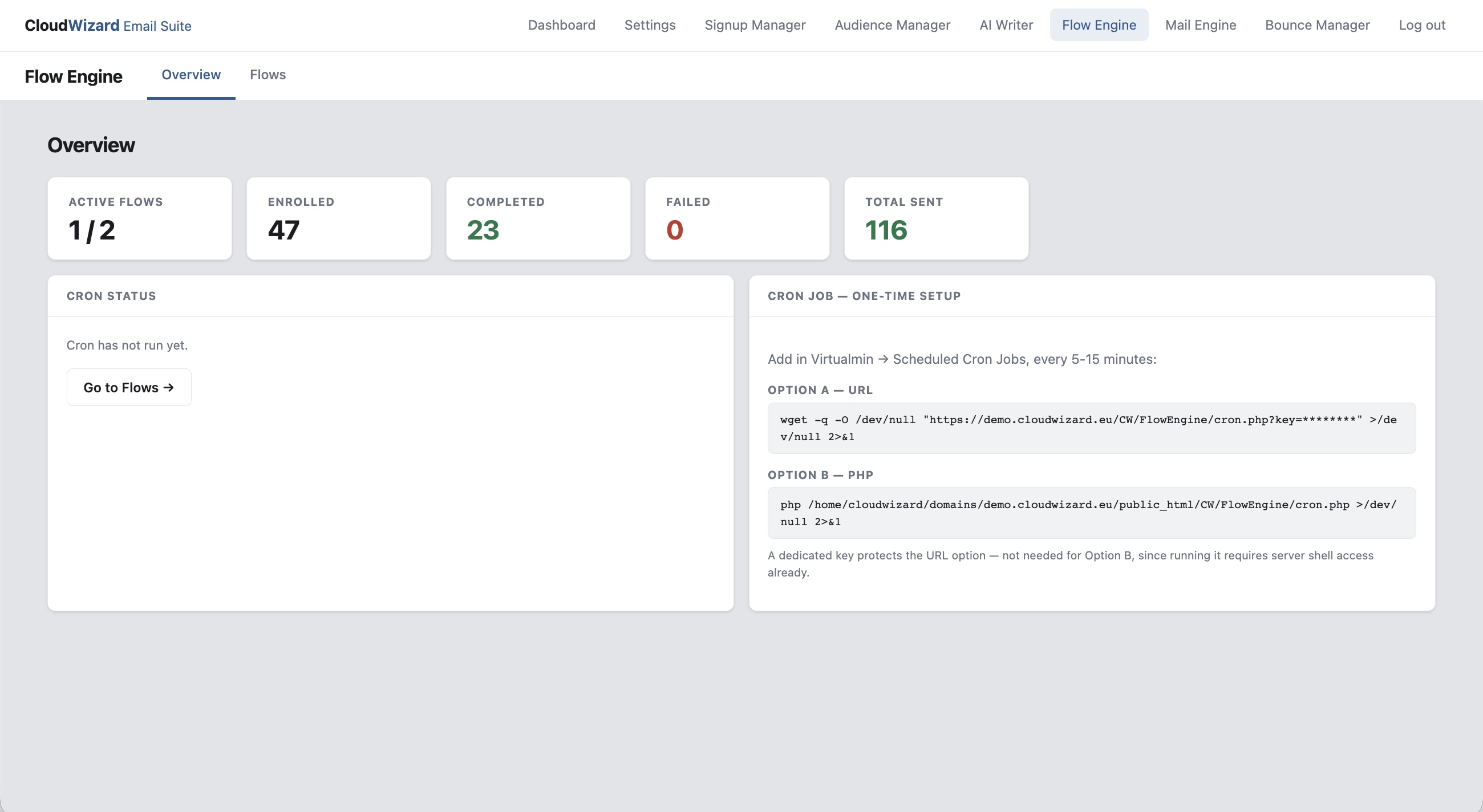
CloudWizard Flow Engine dashboard showing flows, steps and enrollments
Auto
Enrolled when a subscriber confirms
Cron
Steps sent on schedule, no babysitting
PHP 8.1+
No Composer, no monthly fees

Most self-hosted mailers
can't do sequences at all

Bulk-send tools blast a single campaign. Real automation — welcome series, onboarding, drip — usually means bolting on a separate SaaS or building it by hand.

🧵

No way to run multi-step sequences

Most self-hosted mailers send one campaign at a time. A proper welcome or onboarding sequence needs someone watching a calendar.

✋

Manual enrollment

If someone has to add each new subscriber to the sequence by hand, the first email goes out late or not at all.

🔌

Automation tied to one platform

Sequences usually live inside the platform that sends the mail, so leaving it means rebuilding every flow.

💸

SaaS automation tools charge monthly

Automation is often priced as a premium tier. If you self-host, you shouldn't need a second subscription for it.

Everything you need.
Nothing you don't.

A focused automation engine: build a sequence once, and every confirmed subscriber gets it on time.

📅

Timed sequences

One email per step, with a delay in minutes, hours or days after the previous step. Reorder steps with the arrows; delays stay relative to the step before.

⚡

Automatic enrollment

Choose a trigger per flow: enroll automatically when a subscriber confirms onto an Audience Manager list, or enroll manually.

⏱️

Cron-driven

A cron job checks every few minutes for enrollments due their next step. The exact command is generated for your install, as a URL or a direct PHP call.

📨

Its own mailer

Flow Engine sends through the shared PHPMailer using your SMTP settings. Mail Engine is an optional enhancement, not a requirement.

🎨

Templates & AI drafts

With Mail Engine installed, merge each step into a template with an optional CTA button. With AI Writer installed, load a generated draft into a step.

🧪

Preview & test send

Preview any step rendered with its template, then send that exact step to one address to check it in a real inbox before the flow goes live.

👥

Enrollments view

See everyone in a flow: current step, status (active, completed or failed) and next scheduled send. Pause or activate a flow without deleting anything.

🔒

Self-hosted & GDPR-friendly

Runs on your own PHP server. Subscriber data and flow logic never leave your infrastructure.
One engine,
four typical jobs.

Any series of timed emails that should start by itself.

👋 Welcome Series

Welcome → day-3 tip → day-7 story → day-14 offer. Starts the moment someone confirms their signup.

🎓 Onboarding

Walk new customers or members through setup over their first weeks, one step at a time.

🌱 Nurture / Drip

Spread a long piece of content or a course over weeks, delivered on a fixed schedule.

✍️ Written with AI Writer

Draft each step in your own brand voice with AI Writer and load it straight into the step.

From install to first sequence

Drop the module on your server, add the cron job, and build a flow.

1

Create a flow

Name it and choose the trigger: a confirmed signup on a list, or manual enrollment.

2

Add the steps

One email per step with its delay. Preview it and send a test to yourself.

3

Activate & add the cron job

Set the flow to Active and add the generated cron command under Virtualmin or cPanel.

4

Watch it run

Subscribers who confirm are enrolled automatically. The Enrollments page shows each one's step, status and next send.

Runs on standard hosting

Works on any server running PHP and MySQL/MariaDB.

🔗 Flow Engine sends with its own mailer. Audience Manager adds automatic signup-triggered enrollment; Mail Engine adds templates. Manually enrolled flows work without either.

  • PHP 8.1, 8.2, or 8.3
  • MariaDB 10.3+ or MySQL 8+
  • Apache or Nginx web server
  • Cron access (every 5–15 minutes) for step processing
  • SMTP credentials for sending
  • Works on VPS, dedicated and most shared hosting
  • Setup wizard — no config files to edit
  • Lightweight self-hosted application
  • No framework, no Composer, no monthly fees
  • Full source code included
// Install in four steps // 1. Upload the CW/ folder to public_html/ // 2. Open /CW/admin/setup.php, enter DB and SMTP // details and choose an admin password // 3. Log in and click Flow Engine // 4. Add the cron command shown on its Overview page

One price. Forever yours.

No subscriptions. No per-flow fees. No seat limits. Pay once, use on as many of your own servers as you need.

Complete Package
€49
one-time payment · instant download

  • Flow Engine module — full source
  • Timed multi-step sequence builder
  • Automatic enrollment on signup confirmation
  • Cron-driven sending with its own mailer
  • Step preview, test send and enrollments view
  • Installation guide (Nginx + Apache)
  • User manual with examples
  • Unlimited flows & domains
  • All future updates included
  • Email support for 6 months
Buy Now — €49 →

Secure payment via Stripe · Instant delivery · VAT may apply

Want the whole system? The Full Suite — all 6 modules for €196 →

What this would cost elsewhere

€40–150+/month
Automation tiers
in hosted platforms
vs.
€49 once
CloudWizard
Flow Engine, forever

If you self-host email, this is for you

📰 Newsletter publishers
🎓 Course & membership sites
🛍️ E-commerce onboarding
🖥️ Self-hosted email marketers
🏢 Hosting providers
⚙️ VPS operators

See it in action

Explore a live demo with a sample flow and its steps — no login required.

👀 Open Live Demo →

Common questions

No. Flow Engine sends with its own bundled mailer. Audience Manager is needed only for signup-triggered flows, which enroll a subscriber when they confirm onto a list. Mail Engine is needed only for templates. Manually enrolled flows work without either.

Two ways, set per flow: automatically when a subscriber confirms onto an Audience Manager list (any list, or a specific one), or manually.

Each step has a delay in minutes, hours or days after the previous step. The first step uses 0 to send immediately on enrollment. Because delays are relative, reordering steps changes the actual send timing.

It checks every few minutes for enrollments due their next step and enrolls newly confirmed subscribers into signup-triggered flows. The exact command for your install is shown on the Overview page, as a URL with a secret key or as a direct PHP call. Nothing sends without it.

Yes. Preview renders the step with its template applied, and Send test sends that exact step to one address through Flow Engine's own mailer.

Yes. If AI Writer has generated drafts, you can load one into a step's subject, preheader, headline and message.

Yes. A flow can be Draft, Active or Paused, and only Active flows process enrollments. Pausing never deletes anything, while deleting a flow removes its steps and enrollments for good.

Yes — a single purchase covers all your own servers and projects. There are no per-domain or per-server restrictions. The license covers personal and commercial use on servers you own or operate.

You get the full source code — so you can modify anything. For common feature requests, updates are free and included. Send us a message and we will see what we can do.

Designed by someone who has run customer databases and direct mail since the late 1980s.

Not because it's old-school, but because anyone who has actually run a welcome series knows the hard part isn't writing the emails — it's making sure every new subscriber gets them, on time, without anyone remembering to press a button. That's the problem this tool is built to solve.

Get product news and updates

A short email when something new ships. One click to unsubscribe.

Subscribe →